
If you've received a payment from outside of Autobooks that should be applied against an outstanding invoice (such as cash or a check), you can match the funds to that invoice.
Click the Invoices tab. Select the outstanding invoice you received the cash or check payment on.
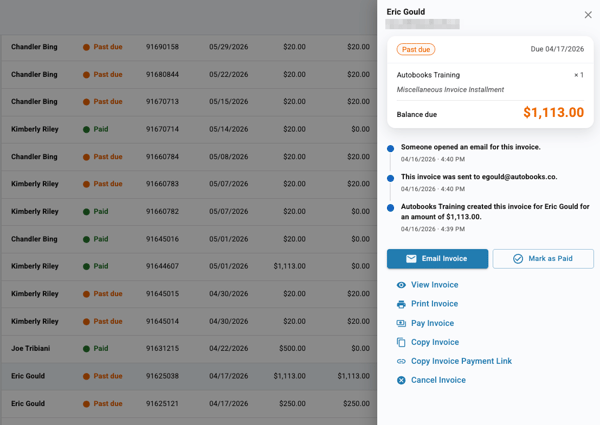
If you have deposited the funds, select Yes. You will be asked to find the payment deposit in your account transaction activity.
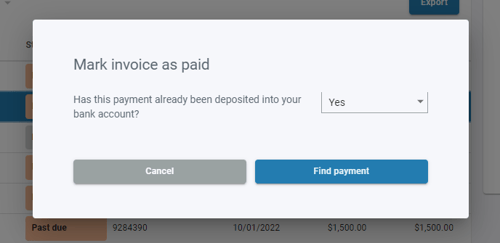
This option is only available if you subscribe monthly to our Accounting and Reporting services. If you do NOT subscribe, select No.
You will be taken to your account transactions list. Select the deposit transaction that you wish to match up to the outstanding invoice, then complete the categorization screen.
If you have not deposited the funds or do not subscribe to our Accounting services, select No. Click Submit to mark the invoice as paid.
Recording a deposit on an Invoice
If your customer paid all or part of their deposit outside of Autobooks, such as by cash or check, you can record it on the invoice.
- Select the invoice from your Invoice list.
- In the right-side menu, click Mark as Paid.
- For "Have these funds already been placed into your bank account?", select No.
- If the money is already in your bank account and you subscribe to our Accounting features, you can select Yes to match it to the invoice instead.
- Choose a Payment type:
- Deposit - Records the full amount still owed on the deposit. The amount is filled in for you.
- Invoice balance - Records everything still owed on the invoice.
- Other amount - Enter the amount you received, such as part of the deposit.
- Enter the Date Paid. You can also add a Memo (optional), such as "Cash Payment."
- Click Submit.
The amount you record is applied to the deposit first. If the deposit is partially paid, your customer's payment page asks only for the amount still due. If you record more than the deposit amount, the extra amount is applied to the remaining balance.
Note: You cannot record more than is owed on the invoice. Once the deposit is paid, Deposit is no longer offered as a payment type.